
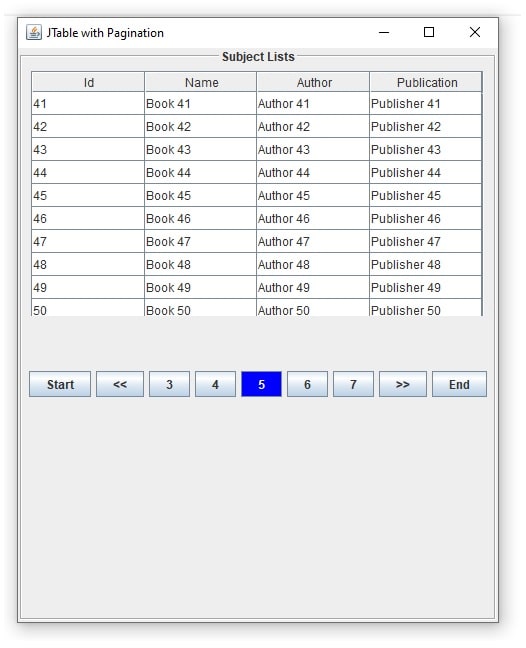
Here we will see how to develop JTable Pagination in java.
We will use JDBC prepared statement and MySQL Database.
We used NetBeans IDE and Jdk 1.8 to develop this project.
Our Project Structure is as below
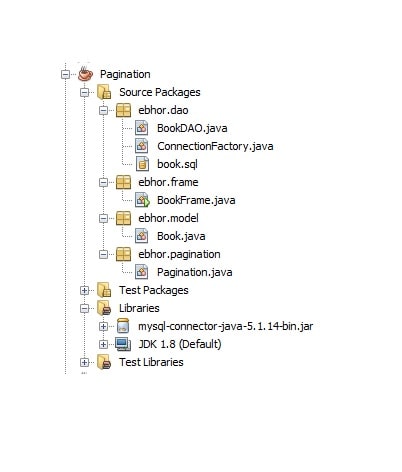
To develop this project we used Book Example.
Project Development Steps are
- Create table in MySQL Database
- SetUp Pagination Project
- Create Model (Pojo) Class
- Create a DAO class to Perform JDBC Operations
- Create Frame to show data in JPanel
- Implement Pagination Concepts.
1 Create Table in MySQL Database
We created ebhor database and table called book as below
CREATE TABLE book(
     id        BIGINT(20) UNSIGNED NOT NULL auto_increment,
     name      VARCHAR(200),
     author    VARCHAR(10),
     publication VARCHAR(100),
     add_date   TIMESTAMP DEFAULT CURRENT_TIMESTAMP(),
     PRIMARY KEY (id),
     UNIQUE KEY (name)
  )
engine=innodb
DEFAULT charset=utf8;
Inserted 100 records on it.
You can use any “MySQL Data Generator like generatedata.com generate 100 rows or as many as you want.
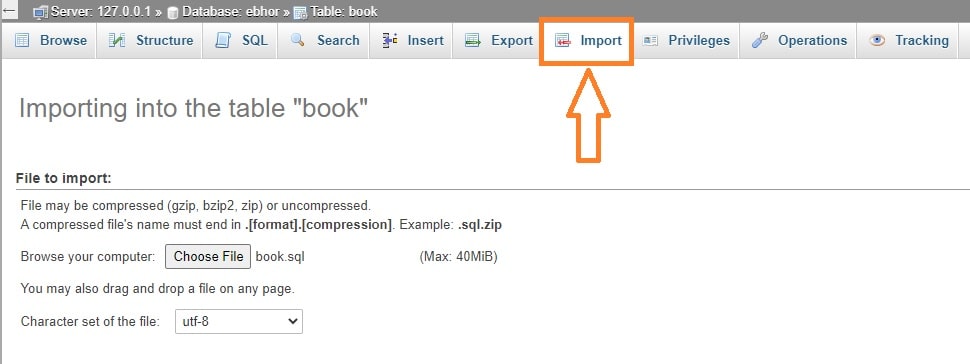
In above figure screen when you scroll down you will find Go button click on it.
Go to browse to see data in table .
After uploading data check you data by clicking on browse in PHPMyAdmin.
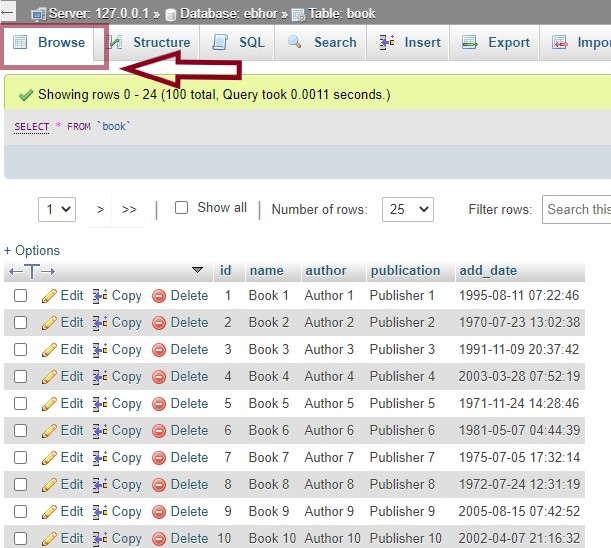
Book table created and 100 Records are uploaded in table.
2. SetUp Pagination Project
Create a new Java Project in Netbeans IDE
Select Java in categories and Java Applications in Project.

Provide name “Pagination” to your project
Click on Use Dedicated Folder for Storing Libraries.
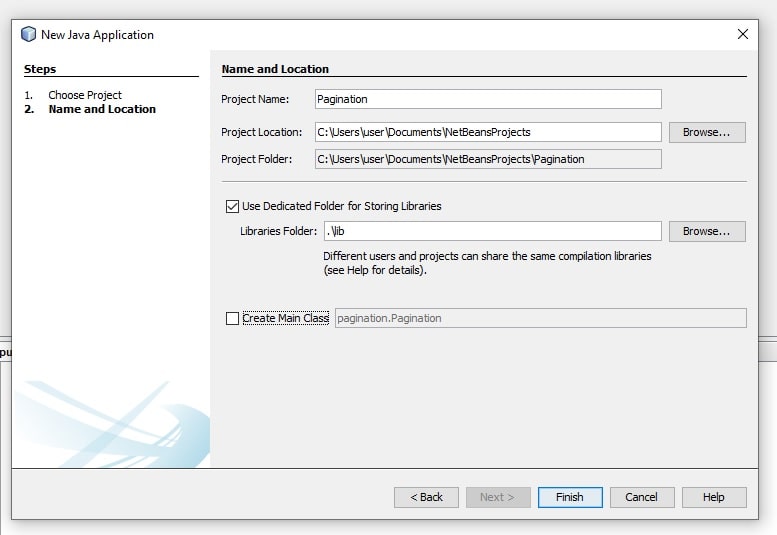
Now at left side on project explorer
click on Pagination Project.
there create packages
ebhor.model
ebhor.dao
ebhor.frame
ebhor.pagination
Now right click on library and and click on menu Add Jar/Folder…
Now include mysql-connector-java-5.1.14-bin.jar Jar file

Next we will create a Pojo class.
3 Create a Model to hold Data
Inside ebhor.model package create a POJO Class Book
Book class contains field id, name, author publication, addDate field.
All fields getter setter , constructos and toString()
Book.java
package ebhor.model;

import java.io.Serializable;
import java.sql.Timestamp;


public class Book implements Serializable{

    private long id;
    private String name;
    private String author;
    private String publication;
    private Timestamp addDate;

    public Book(){

    }

    public Book(long id, String name, String author, String publication, Timestamp addDate) {
        this.id = id;
        this.name = name;
        this.author = author;
        this.publication = publication;
        this.addDate = addDate;
    }

    @Override
    public String toString() {
        return "Book{" + "id=" + id + ", name=" + name + ", author=" + author + ", publication=" + publication + ", addDate=" + addDate + '}';
    }

    public long getId() {
        return id;
    }

    public void setId(long id) {
        this.id = id;
    }

    public String getName() {
        return name;
    }

    public void setName(String name) {
        this.name = name;
    }

    public String getAuthor() {
        return author;
    }

    public void setAuthor(String author) {
        this.author = author;
    }

    public String getPublication() {
        return publication;
    }

    public void setPublication(String publication) {
        this.publication = publication;
    }

    public Timestamp getAddDate() {
        return addDate;
    }

    public void setAddDate(Timestamp addDate) {
        this.addDate = addDate;
    }

}
4 Create a DAO Class to Perform JDBC Operations
Here establish a connection with database.
Extracting data from database are handling .
Inside ebhor.dao following classes are there
ConnectionFactory.java
This class contains a method getConnection() creates connection with MySQL database using database username, password and database name.
getConnection() returns connection Object.
package ebhor.dao;

import java.sql.Connection;
import java.sql.DriverManager;
import java.sql.SQLException;

public class ConnectionFactory {

    public static Connection getConnection() {
        Connection c = null;
        try {
            Class.forName("com.mysql.jdbc.Driver");
            c = DriverManager.getConnection("jdbc:mysql://localhost:3306/ebhor?useUnicode=true&characterEncoding=UTF-8", "ebhor_user", "21V6");
        } catch (ClassNotFoundException e) {
            System.out.println("ClassNotFoundException " + e);
        } catch (SQLException e) {
            System.out.println("SQLException " + e);
        }
        return c;
    }
}
BookDAO.java
This class contains two methods
1 fetchBySize() – This method takes two integer arguments
- start is used to select start row in book table.
- size is used to select specified number of elements from start.
If you pass parameter fetchBySize(11,10) then it will select 10 records from MySQL with starting table row of 11.
Result set values are stored in DefaultTableModel Object.
DefaultTableModel value can easily represent data in JTable.
2. getRowCount() this method is used to find total number of rows in table.
package ebhor.dao;

import java.sql.Connection;
import java.sql.PreparedStatement;
import java.sql.ResultSet;
import java.sql.SQLException;
import javax.swing.table.DefaultTableModel;

public class BookDAO {

    Connection con = null;
    PreparedStatement ps = null;
    ResultSet rs = null;
    int st;//status

    public DefaultTableModel fetchBySize(int start, int size) {
        System.out.println("book frame dao");
        DefaultTableModel model = new DefaultTableModel(new String[]{"Id", "Name", "Author", "Publication",}, 0);
        con = ConnectionFactory.getConnection();
        try {
            String query = "select * from book limit " + start + "," + size;
            System.out.println(query);
            ps = con.prepareStatement(query);
            rs = ps.executeQuery();
            int i = 0;
            while (rs.next()) {
                long id = rs.getLong("id");
                String name = rs.getString("name");
                String author = rs.getString("author");
                String publication = rs.getString("publication");
                model.addRow(new Object[]{id, name, author, publication});
            }
        } catch (Exception e) {
            e.printStackTrace();
        } finally {
            try {
                con.close();
            } catch (SQLException ex) {
                ex.printStackTrace();
            }
        }
        return model;
    }

    public double getRowCount() {
        System.out.println("book table row count");
        con = ConnectionFactory.getConnection();
        long count = 0;
        try {
            String query = "SELECT count(*) FROM book ";
            System.out.println(query);
            ps = con.prepareStatement(query);
            rs = ps.executeQuery();
            while (rs.next()) {
                count = rs.getLong("count(*)");

            }
        } catch (Exception e) {
            e.printStackTrace();
        } finally {
            try {
                con.close();
            } catch (SQLException ex) {
                ex.printStackTrace();
            }
        }
        return count;
    }
}
5 Create Frame to show data in JPanel
UI designing and Action handling work is done here.
BookFrame.java is created in ebhor.frame package
BookFrame.java contains following methods
1 A Default Constructor –
Here a main JPanel is created with GridLayout.
Two other JPanel is created.
tablePanel -to place JTable and pagingPanel to place Paging buttons.
Inside this getCount() and getPageData() is called.
2 getCount() –
This method work is to find book table record count by calling getRowCount() from BookDAO.java.
It also calculate the total pages for pagination based on PAGE_SIZE field.
3. getPageData() –
Work of this method is to get records from Book Table. and set it to JTable based on page number.
To update pagination details getPaginationDetails() is get called.
4 getPaginationDetails() –
This method is used to get dynamic page numbers from Pagination.java.
According to numbers it generates buttons and add actionListeners to buttons.
Also handle button disable and enable features for first and last page number.
5 ActionPerformed()-
Handle the click actions of dynamically generated buttons.
6 public static void main() –
This function is starting execution point for our program.
package ebhor.frame;
import ebhor.dao.BookDAO;
import java.awt.Color;
import java.awt.Container;
import java.awt.GridLayout;
import java.awt.event.ActionEvent;
import java.awt.event.ActionListener;
import javax.swing.BorderFactory;
import javax.swing.JButton;
import javax.swing.JFrame;
import javax.swing.JOptionPane;
import javax.swing.JPanel;
import javax.swing.JScrollPane;
import javax.swing.JTable;
import javax.swing.border.TitledBorder;
import javax.swing.table.DefaultTableModel;
public class BookFrame extends JFrame implements ActionListener {
    JTable jTable;
    Container container;
    //  JButton start, end;
    DefaultTableModel model;
    BookDAO dao = new BookDAO();
    /*used for pagination*/
    final int PAGE_SIZE = 10;
    double tableRowCount;
    int totalPages;
    int currentPage;
    int startRow;
    int numbers[];
    JButton[] buttons;
    JPanel mainPanel, tablePanel, pagingPanel;
    BookFrame() {
        System.out.println("calling bookframe");
        container = this.getContentPane();
        mainPanel = new JPanel(new GridLayout(2, 1, 30, 50)); // main panel
        mainPanel.setBorder(BorderFactory.createTitledBorder(BorderFactory.createEtchedBorder(), "Subject Lists", TitledBorder.CENTER, TitledBorder.TOP));
        //create a JTable panel
        tablePanel = new JPanel();
        DefaultTableModel dm = (DefaultTableModel) dao.fetchBySize(0, 10);
        jTable = new JTable(dm);
        tablePanel.add(new JScrollPane(jTable));
        jTable.setRowHeight(23);
        //ading table panel to main panel
        mainPanel.add(tablePanel);
        //paging button panel
        pagingPanel = new JPanel();
        buttons = new JButton[9];
        //adding paging panel to main panel
        mainPanel.add(pagingPanel);
        //adding main panel to container
        container.add(mainPanel);
        getCount();
        getPageData(1);
    }
    @Override
    public void actionPerformed(ActionEvent e) {
        System.out.println("event called" + e.getSource());
        String pageNumber = "";
        if (e.getSource() instanceof JButton) {
            if (((JButton) e.getSource()).getText().equalsIgnoreCase("Start")) {
                pageNumber = "1";
            } else if (((JButton) e.getSource()).getText().equalsIgnoreCase("End")) {
                pageNumber = totalPages + "";
            } else if (((JButton) e.getSource()).getText().equalsIgnoreCase("<<")) {
                pageNumber = (currentPage - 1) + "";
            } else if (((JButton) e.getSource()).getText().equalsIgnoreCase(">>")) {
                pageNumber = (currentPage + 1) + "";
            } else {
                pageNumber = ((JButton) e.getSource()).getText();
            }
            System.out.println("hello " + pageNumber);
            //this.repaint();
            getPageData(Integer.parseInt(pageNumber));
            getPaginationDetails();
        }
    }
    /*get total numbers of record in table*/
    public void getCount() {
        tableRowCount = dao.getRowCount();
        if (tableRowCount > 0) {
            totalPages = (int) Math.ceil(tableRowCount / PAGE_SIZE);
            currentPage = 1;
            System.out.println("row count is " + tableRowCount + "page Count" + totalPages);
        } else {
            JOptionPane.showMessageDialog(null, "No Record to display");
        }
    }
    /*Get data from table based on page no*/
    public void getPageData(int pageNo) {
        currentPage = pageNo;
        //calculate starting row for pagination
        startRow = PAGE_SIZE * (pageNo - 1);
        DefaultTableModel dm = (DefaultTableModel) dao.fetchBySize(startRow, PAGE_SIZE);
        jTable.setModel(dm);
        getPaginationDetails();
    }
    // dynamically generate page numbers
    public void getPaginationDetails() {
        System.out.println("pagination details");
        int inc = 0;
        System.out.println(currentPage + "  " + totalPages);
        pagingPanel.removeAll();
        pagingPanel.revalidate();
        numbers = ebhor.pagination.Pagination.getPageNos(currentPage, totalPages);
        buttons[0] = new JButton("Start");
        buttons[0].addActionListener(this);
        pagingPanel.add(buttons[0]);
        buttons[1] = new JButton("<<");
        buttons[1].addActionListener(this);
        pagingPanel.add(buttons[1]);
        for (int i = 0; i < numbers.length; i++) {
            if (numbers[i] != 0) {
                buttons[i + 2] = new JButton(numbers[i] + "");
                buttons[i + 2].setBounds(500 + inc, 500, 50, 30);
                buttons[i + 2].addActionListener(this);
                pagingPanel.add(buttons[i + 2]);
                inc += 40;
            }
            if (numbers[i] == currentPage) {
                buttons[i + 2].setBackground(Color.BLUE);
                buttons[i + 2].setForeground(Color.WHITE);
            }
        }
        buttons[7] = new JButton(">>");
        buttons[7].addActionListener(this);
        pagingPanel.add(buttons[7]);
        buttons[8] = new JButton("End");
        buttons[8].addActionListener(this);
        pagingPanel.add(buttons[8]);
        /*if current page is 1 then disable start and previous button*/
        if (currentPage == 1) {
            buttons[0].setEnabled(false);
            buttons[1].setEnabled(false);
        }
        /*if current page is last then disable end and next button*/
        if (currentPage == PAGE_SIZE) {
            buttons[7].setEnabled(false);
            buttons[8].setEnabled(false);
        }
    }
    //start of execution
    public static void main(String[] args) {
        BookFrame frame = new BookFrame();
        frame.setTitle("JTable with Pagination");
        frame.setVisible(true);
        frame.pack();
        frame.setDefaultCloseOperation(JFrame.EXIT_ON_CLOSE);
    }
}
6 Implement Pagination Concepts
ebhor.pagination.Pagination class is created to implement pagination concept.
public static int[] getPageNos(int currentPage, int totalPages) is used to implement pagination concept.
it takes two argument currentPage and totalPages to get next set of page numbers and return integer array.
Pagination.java
package ebhor.pagination;
public class Pagination {
    public static int[] getPageNos(int currentPage, int totalPages) {
        int[] pages = new int[5];
        if (currentPage <= 2) {
            System.out.println("currentPage <=2");
            if (totalPages >= 5) {
                System.out.println("if");
                for (int i = 0; i <= 4; i++) {
                    pages[i] = i + 1;
                }
            } else {
                System.out.println("else");
                for (int i = 0; i < totalPages; i++) {
                    pages[i] = i + 1;
                }
            }
        } else if (currentPage == totalPages) {
            System.out.println("currentPage == totalPages");
            if (totalPages >= 5) {
                System.out.println("if");
                int j = 4;
                for (int i = 0; i <= 4; i++) {
                    pages[i] = currentPage - j--;
                }
            } else {
                System.out.println("else");
                int j = 3;
                for (int i = 0; i <= totalPages; i++) {
                    pages[i] = currentPage - j--;
                }
            }
        } else if ((currentPage - 2) >= 1 && (currentPage + 2) <= totalPages) {
            System.out.println("((currentPage - 2) >= 1 && (currentPage + 2) <= totalPages)");
            for (int i = 0; i <= 4; i++) {
                pages[i] = currentPage - 2 + i;
            }
        } else if (currentPage == totalPages - 1) {
            System.out.println("currentPage == totalPages - 1");
            for (int i = 0; i <= 4; i++) {
                pages[i] = currentPage - 3 + i;
            }
        }
        return pages;
    }
}