
JComboBox is Drop down box with multiple values in Java Swing.
It is defined as javax.swing.JComboBox<E>.
Here E is type of element of JComboBox.
public class JComboBox
extends JComponent
implements ItemSelectable, ListDataListener, ActionListener, Accessible
JComboBox Constructors
| Sr No | Constructors and Description |
|---|---|
| 1 | JComboBox() Create a JComboBox with default default data model |
| 2 | JComboBox(ComboBoxModel Create a JComboBox with ComboBoxModel aModel |
| 3 | JComboBox(E[] items) Create a JComboBox with specified array |
| 4 | JComboBox(Vector Create a JComboBox with specified Vector |
Methods of JComboBox
| Sr No | Methods and Description |
|---|---|
| 1 | void addItem(E item) Add an Item to item list |
| 2 | Object getSelectedItem() Returns the selected Item |
| 3 | void removeItem(Object anObject) Remove an Item from Item list |
| 4 | void removeItem(Object anObject) Remove an Item from Item list |
| 5 | void addActionListener(ActionListener l) Add action listener |
| 6 | getItemAt(int index) Get Item at specified index |
JComboBox add and show items
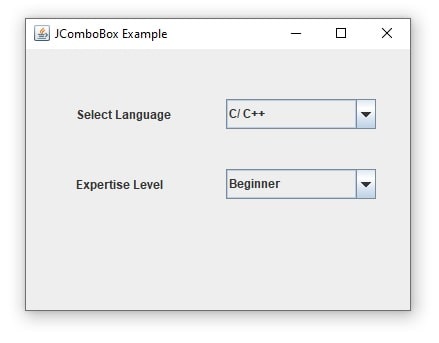
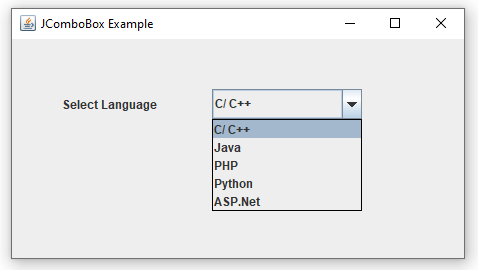
- Create a frame with any size.
- Create Reference for Container, JLables and JComboBox.
- get content page and set its layout null.
- Create JLabels and JComboBox objects.
- Add elements to JComboBox using addItem() and by using String[]
- Set bounds for JLables and JComboBox
- Add all Components to container.
Examples of JComboBox
package swing;
import java.awt.Container;
import javax.swing.JComboBox;
import javax.swing.JFrame;
import javax.swing.JLabel;
public class JComboBoxExample1 extends JFrame {
    Container container;
    JLabel label1, label2;
    JComboBox jComboBox1, jComboBox2;
    public JComboBoxExample1() {
        container = this.getContentPane();
        container.setLayout(null);
        /*First label and combobox*/
        label1 = new JLabel("Select Language");
        label1.setBounds(50, 50, 100, 30);
        jComboBox1 = new JComboBox<>();
        jComboBox1.addItem("C/ C++");
        jComboBox1.addItem("Java");
        jComboBox1.addItem("PHP");
        jComboBox1.addItem("Python");
        jComboBox1.addItem("ASP.Net");
        jComboBox1.setBounds(200, 50, 150, 30);
        /*Second label and combobox*/
        label2 = new JLabel("Expertise Level");
        label2.setBounds(50, 120, 100, 30);
        String[] experties = {"Beginner", "Intermediate", "Advanced", "Expert"};
        jComboBox2 = new JComboBox(experties);
        jComboBox2.setBounds(200, 120, 150, 30);
        //adding components
        container.add(label1);
        container.add(jComboBox1);
        container.add(label2);
        container.add(jComboBox2);
    }
    public static void main(String[] args) {
        JComboBoxExample1 frame = new JComboBoxExample1();
        frame.setTitle("JComboBox Example");
        frame.setVisible(true);
        frame.setSize(400, 300);
        frame.setDefaultCloseOperation(JFrame.EXIT_ON_CLOSE);
    }
}
JComboBox actionlistener get selected item and get selected index
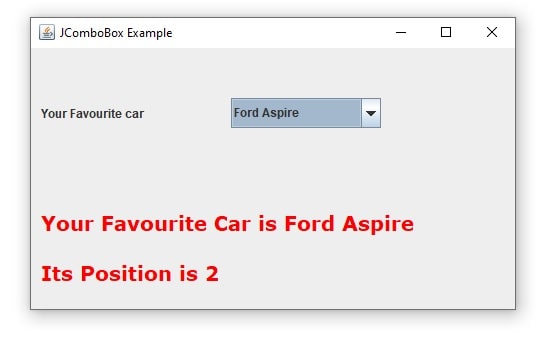
jComboBox1.addActionListener(this); is used to add action listener to jComboBox1.
You have to override actionPerformed(ActionEvent e) to handle combo box event.
combo.getSelectedItem() displays the selected item
combo.getSelectedIndex() is used to display selected item index.
JComboBox indexing starts from 0.
jcombobox get selected item example
import java.awt.Color;
import java.awt.Container;
import java.awt.Font;
import java.awt.event.ActionEvent;
import java.awt.event.ActionListener;
import javax.swing.JComboBox;
import javax.swing.JFrame;
import javax.swing.JLabel;
public class JComboBoxExample2 extends JFrame implements ActionListener {
    Container container;
    JLabel label1, label2, label3;
    JComboBox jComboBox1;
    public JComboBoxExample2() {
        container = this.getContentPane();
        container.setLayout(null);
        label1 = new JLabel("Your Favourite car ");
        label1.setBounds(10, 50, 150, 30);
        String[] cars = {"BMW", "Honda City", "Ford Aspire", "Land Rover", "Mercedes Benz"};
        jComboBox1 = new JComboBox<>(cars);
        jComboBox1.setBounds(200, 50, 150, 30);
        Font f = new Font("Verdana", Font.BOLD, 20);
        label2 = new JLabel();
        label2.setFont(f);
        label2.setForeground(Color.RED);
        label2.setBounds(10, 150, 500, 50);
        label3 = new JLabel();
        label3.setFont(f);
        label3.setForeground(Color.RED);
        label3.setBounds(10, 200, 500, 50);
        //adding components
        container.add(label1);
        container.add(jComboBox1);
        container.add(label2);
        container.add(label3);
        //add actionlistement to combobox
        jComboBox1.addActionListener(this);
    }
    public void actionPerformed(ActionEvent e) {
        JComboBox combo = (JComboBox) e.getSource();
        label2.setText("Your Favourite Car is " + combo.getSelectedItem());
        label3.setText("Its Position is " + combo.getSelectedIndex());
    }
    public static void main(String[] args) {
        JComboBoxExample2 frame = new JComboBoxExample2();
        frame.setTitle("JComboBox Example");
        frame.setVisible(true);
        frame.setSize(500, 300);
        frame.setDefaultCloseOperation(JFrame.EXIT_ON_CLOSE);
    }
}
JComboBox set selected item and set selected index
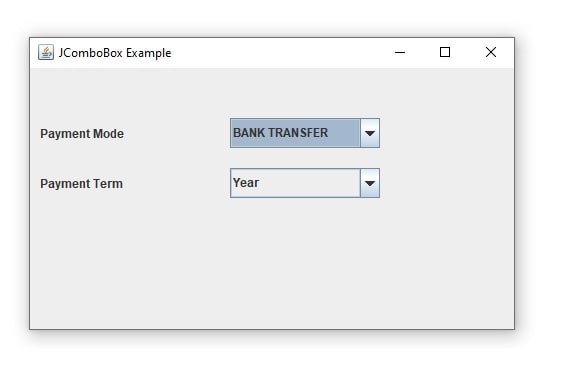
- create JComboBox
- To select specific item based on name use
comboBoxRef.setSelectedItem("Item Name"); - To select specific item based on index use
comboBoxRef.setSelectedIndex(3); - Index number must be between 0 to itemSize-1
import java.awt.Container;
import javax.swing.JComboBox;
import javax.swing.JFrame;
import javax.swing.JLabel;
public class JComboBoxExample3 extends JFrame {
    Container container;
    JLabel label1, label2;
    JComboBox jComboBox1, jComboBox2;
    public JComboBoxExample3() {
        container = this.getContentPane();
        container.setLayout(null);
        label1 = new JLabel("Payment Mode ");
        label1.setBounds(10, 50, 150, 30);
        String[] paymentModes = {"Cash", "DD", "BANK TRANSFER", "UPI", "OTHER"};
        jComboBox1 = new JComboBox<>(paymentModes);
        jComboBox1.setSelectedItem("BANK TRANSFER");
        jComboBox1.setBounds(200, 50, 150, 30);
        label2 = new JLabel("Payment Term ");
        label2.setBounds(10, 100, 150, 30);
        String[] paymentTerm = {"Monthly", "Quarterly", "Half Year", "Year"};
        jComboBox2 = new JComboBox<>(paymentTerm);
        jComboBox2.setSelectedIndex(3);
        jComboBox2.setBounds(200, 100, 150, 30);
        //adding components
        container.add(label1);
        container.add(jComboBox1);
         container.add(label2);
        container.add(jComboBox2);
    }
    public static void main(String[] args) {
        JComboBoxExample3 frame = new JComboBoxExample3();
        frame.setTitle("JComboBox Example");
        frame.setVisible(true);
        frame.setSize(500, 300);
        frame.setDefaultCloseOperation(JFrame.EXIT_ON_CLOSE);
    }
}
jcombobox get selected item using ItemListener
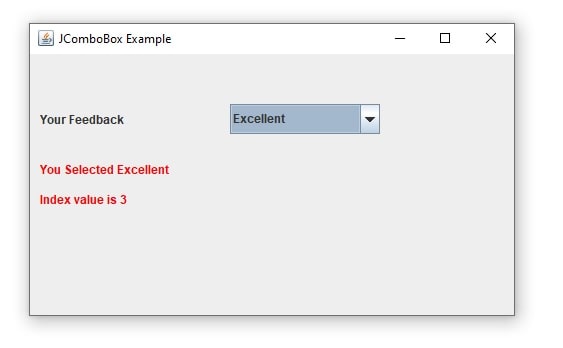
JComboBox Example ItemListener
- Create JComboBox
- Add ItemListner to this
- override itemStateChanged(ItemEvent e) method
- get Item Event Source from combobox
- select item and index by using getSelectedItem() and getSelectedIndex()
import java.awt.Color;
import java.awt.Container;
import java.awt.event.ItemEvent;
import java.awt.event.ItemListener;
import javax.swing.JComboBox;
import javax.swing.JFrame;
import javax.swing.JLabel;
public class JComboBoxExample4 extends JFrame implements ItemListener {
    Container container;
    JLabel label1, label2, label3;
    JComboBox jComboBox1;
    public JComboBoxExample4() {
        container = this.getContentPane();
        container.setLayout(null);
        label1 = new JLabel("Your Feedback ");
        label1.setBounds(10, 50, 150, 30);
        String[] paymentModes = {"Poor", "Average", "Good", "Excellent"};
        jComboBox1 = new JComboBox<>(paymentModes);
        jComboBox1.setSelectedItem("Good");
        jComboBox1.setBounds(200, 50, 150, 30);
        label2 = new JLabel();
        label2.setBounds(10, 100, 500, 30);
        label2.setForeground(Color.RED);
        label3 = new JLabel();
        label3.setBounds(10, 130, 500, 30);
        label3.setForeground(Color.RED);
        jComboBox1.addItemListener(this);
        //adding components
        container.add(label1);
        container.add(jComboBox1);
        container.add(label2);
        container.add(label3);
    }
    @Override
    public void itemStateChanged(ItemEvent e) {
        if (e.getSource() == jComboBox1) {
            label2.setText("You Selected " + jComboBox1.getSelectedItem());
            label3.setText("Index value is " + jComboBox1.getSelectedIndex());
        }
    }
    public static void main(String[] args) {
        JComboBoxExample4 frame = new JComboBoxExample4();
        frame.setTitle("JComboBox Example");
        frame.setVisible(true);
        frame.setSize(500, 300);
        frame.setDefaultCloseOperation(JFrame.EXIT_ON_CLOSE);
    }
}
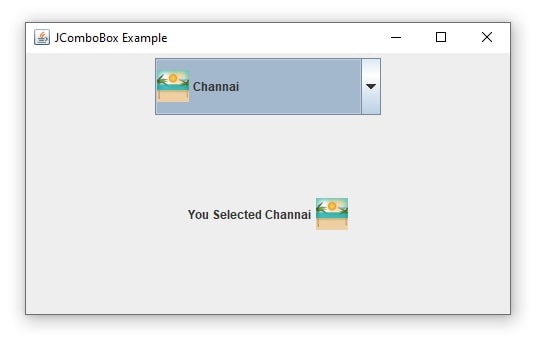
JComboBox Show Image in combo box using ListCellRenderer and ItemListner
import java.awt.Color;
import java.awt.Component;
import java.awt.Container;
import java.awt.Dimension;
import java.awt.Font;
import java.awt.GridLayout;
import java.awt.event.ItemEvent;
import java.awt.event.ItemListener;
import java.util.Vector;
import javax.swing.ImageIcon;
import javax.swing.JComboBox;
import javax.swing.JFrame;
import javax.swing.JLabel;
import javax.swing.JList;
import javax.swing.JPanel;
import javax.swing.ListCellRenderer;
import static javax.swing.SwingConstants.CENTER;
public class JComboBoxExample6 extends JFrame implements ItemListener {
Container container;
JLabel label1, label2, label3;
JComboBox jComboBox1;
JPanel mainPanel, comboPanel, infoPanel;
ImageIcon imageIcon;
Vector cityList = new Vector();
public JComboBoxExample6() {
container = this.getContentPane();
mainPanel = new JPanel(new GridLayout(2, 0, 20, 20));
comboPanel = new JPanel();
ComboListInitializer();
jComboBox1 = new JComboBox(cityList);
ComboBoxRenderer renderer = new ComboBoxRenderer();
renderer.setPreferredSize(new Dimension(200, 50));
jComboBox1.setRenderer(renderer);
jComboBox1.setMaximumRowCount(4);
jComboBox1.addItemListener(this);
comboPanel.add(jComboBox1);
infoPanel = new JPanel();
label2 = new JLabel();
infoPanel.add(label2);
label3 = new JLabel();
infoPanel.add(label3);
mainPanel.add(comboPanel);
mainPanel.add(infoPanel);
container.add(mainPanel);
}
@Override
public void itemStateChanged(ItemEvent e) {
if (e.getSource() == jComboBox1) {
City c = (City) jComboBox1.getSelectedItem();
label2.setText("You Selected " + c.getName());
label3.setIcon(c.getImage());
}
}
public void ComboListInitializer() {
cityList.add(new City(1, "Delhi", new ImageIcon("D://icons/india-gate.png")));
cityList.add(new City(2, "Agra", new ImageIcon("D://icons/taj-mahal.png")));
cityList.add(new City(3, "Kolkata", new ImageIcon("D://icons/victoria-memorial.png")));
cityList.add(new City(4, "Channai", new ImageIcon("D://icons/beach.png")));
cityList.add(new City(5, "Bengaluru", new ImageIcon("D://icons/buildings.png")));
}
public static void main(String[] args) {
JComboBoxExample6 frame = new JComboBoxExample6();
frame.setTitle("JComboBox Example");
frame.setVisible(true);
frame.setSize(500, 300);
frame.setDefaultCloseOperation(JFrame.EXIT_ON_CLOSE);
}
class ComboBoxRenderer extends JLabel
implements ListCellRenderer
How to use combobox in java netbeans
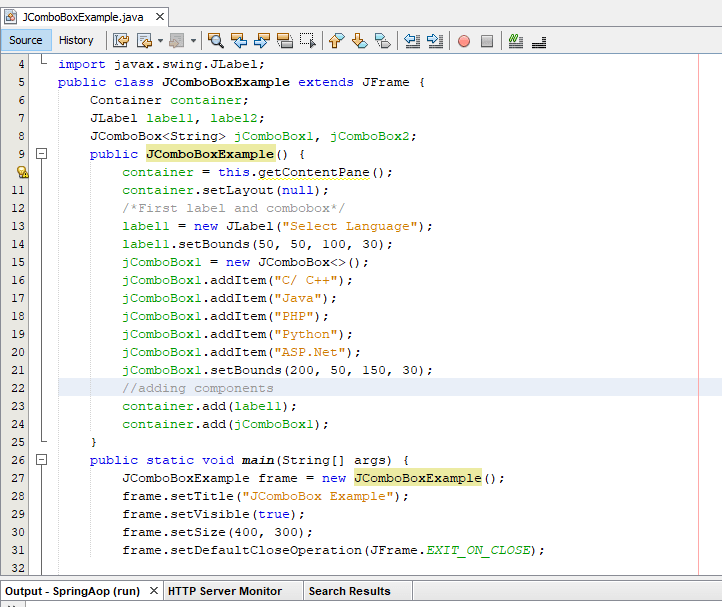
We have developed many examples in netbeans.
It is a very simple copy and above example and paste in netbeans/ eclipse then run.
Run a swing program is same as simple java program
Read More
- JLabel in Java Swing
- JComboBox in Java Swing
- JTable in Java Swing
- JTable Pagination in Java JDBC
- Registration Form in Java Swing
- Login form in Java Swing
- Simple Calculator in Java Applet
- Applet Life Cycle in Java
Image Reference
https://freeicons.io/indian-republic-day-icons/india-gate-indian%20republic%20day-icon-7661#
Taj Mahal icon icon by Icons8