
JLabel in Java Swing is an object that is used to display text and images in a Frame.
Jlabel uses to display information, show different messages, and make the frame interactive and readable.
JLabel class declaration
public class JLabel
extends JComponent
implements SwingConstants, Accessible
JLabel extends JComponent and implements SwingConstants and Accessible Interfaces.
JLabel Constructors
| Sr No | Constructor and Description |
|---|---|
| 1 | JLabel() Create a Jlabel with no image and empty text |
| 2 | JLabel(String text) Create a Jlabel with specified text |
| 3 | JLabel(String text, int horizontalAlignment) Create a Jlabel with specified text and horizontalAlignment |
| 4 | JLabel(String text, Icon icon, int horizontalAlignment) Create a Jlabel with specified text, image and horizontalAlignment |
| 5 | JLabel(Icon image) Create a Jlabel with specified image |
| 6 | JLabel(Icon image, int horizontalAlignment) Create a Jlabel with specified image and horizontalAlignment |
Commonly used JLabel Methods
| Sr No | Method and Description |
|---|---|
| 1 | String getText() Get the text of label |
| 2 | void setText(String text) Set the text of label |
| 3 | Icon getIcon() Return the Graphic Icon of label |
| 4 | void setIcon(Icon icon) Set the graphic icon for label |
| 5 | void setHorizontalAlignment(int alignment) Set Horizontal alignment of label |
| 6 | int getHorizontalAlignment() Get Horizontal alignment of label |
| 5 | void setVerticalAlignment(int alignment) Set Vertical alignment of label |
| 6 | int getVerticalAlignment() Get Vertical alignment of label |
JLabel contains more methods we have used a few of them here.
jlabel java Examples
import java.awt.Container;
import javax.swing.JFrame;
import javax.swing.JLabel;

public class JLabelExample1 extends JFrame {

    Container container;
    JLabel label1, label2;

    public JLabelExample1() {

        container = this.getContentPane();
        container.setLayout(null);

        label1 = new JLabel("Welcome to Java");
        label1.setBounds(20, 40, 150, 40);
        container.add(label1);
        label2 = new JLabel("Learn with examples");
        label2.setBounds(20, 80, 150, 40);
        container.add(label2
        );

    }

    public static void main(String[] args) {
        JLabelExample1 frame = new JLabelExample1();
        frame.setTitle("Label Example");
        frame.setVisible(true);
        frame.setBounds(250, 100, 520, 300);
        frame.setDefaultCloseOperation(JFrame.EXIT_ON_CLOSE);
        frame.setResizable(false);
    }

}
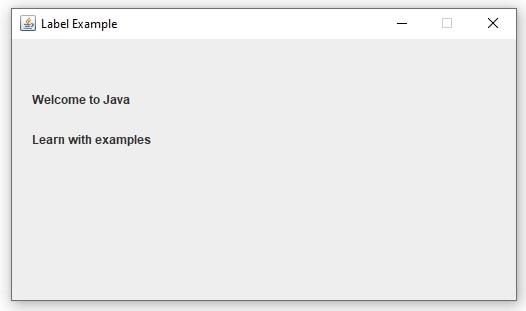
Label in java Example- How to change jlabel background color
import java.awt.Color;
import java.awt.Container;
import javax.swing.JFrame;
import javax.swing.JLabel;

public class JLabelExample2 extends JFrame {

    Container container;
    JLabel label1, label2, label3, label4;

    public JLabelExample2() {

        container = this.getContentPane();
        container.setLayout(null);

        label1 = new JLabel("This is an Error message");
        label1.setBounds(20, 40, 250, 40);
        label1.setBackground(Color.red);
        label1.setOpaque(true);
        container.add(label1);
        label2 = new JLabel("This is a success message");
        label2.setBounds(20, 100, 250, 40);
        label2.setBackground(Color.GREEN);
        label2.setOpaque(true);
        container.add(label2);
        label3 = new JLabel("This is an info message");
        label3.setBounds(20, 160, 250, 40);
        label3.setBackground(Color.BLUE);
        label3.setOpaque(true);
        container.add(label3);
        label4 = new JLabel("This is a warning message");
        label4.setBounds(20, 220, 250, 40);
        label4.setBackground(Color.YELLOW);
        label4.setOpaque(true);
        container.add(label4);

    }

    public static void main(String[] args) {
        JLabelExample2 frame = new JLabelExample2();
        frame.setTitle("Label Example");
        frame.setVisible(true);
        frame.setBounds(250, 100, 520, 320);
        frame.setDefaultCloseOperation(JFrame.EXIT_ON_CLOSE);
        frame.setResizable(false);
    }
}
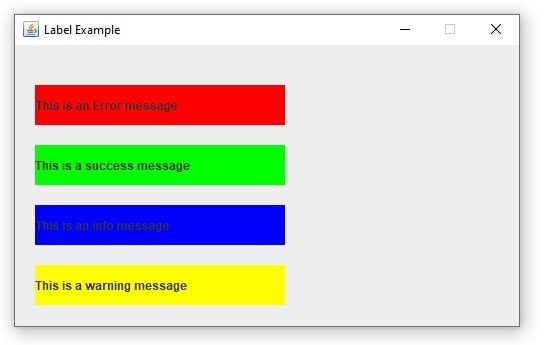
JLabel Example – Foreground and background color change
package swing;

import java.awt.Color;
import java.awt.Container;
import javax.swing.JFrame;
import javax.swing.JLabel;

public class JLabelExample3 extends JFrame {

    Container container;
    JLabel label1, label2, label3, label4, label5;

    public JLabelExample3() {

        container = this.getContentPane();
        container.setLayout(null);

        label1 = new JLabel("This is an Error message");
        label1.setBounds(20, 10, 250, 40);
        label1.setForeground(Color.red);
        container.add(label1);
        label2 = new JLabel("This is a success message");
        label2.setBounds(20, 60, 250, 40);
        label2.setForeground(new Color(0, 128, 0));
        container.add(label2);
        label3 = new JLabel("This is an info message");
        label3.setBounds(20, 110, 250, 40);
        label3.setForeground(Color.BLUE);
        container.add(label3);
        label4 = new JLabel("This is a warning message");
        label4.setBounds(20, 160, 250, 40);
        label4.setForeground(Color.decode("#FFA500"));
        container.add(label4);

        label5 = new JLabel("This is a Test message");
        label5.setBounds(20, 210, 250, 40);
        label5.setBackground(Color.BLACK);
        label5.setForeground(Color.WHITE);
        label5.setOpaque(true);
        container.add(label5);

    }

    public static void main(String[] args) {
        JLabelExample3 frame = new JLabelExample3();
        frame.setTitle("Label Example");
        frame.setVisible(true);
        frame.setBounds(250, 100, 520, 320);
        frame.setDefaultCloseOperation(JFrame.EXIT_ON_CLOSE);
        frame.setResizable(false);
    }
}
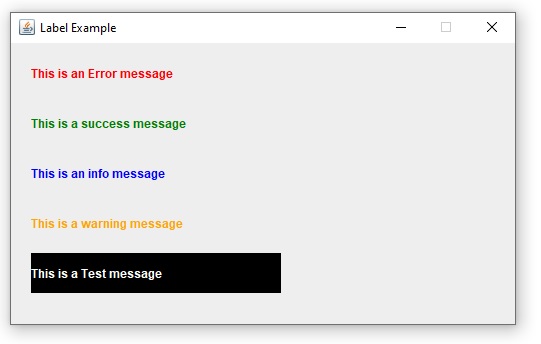
Jlabel set font Example – Set JLable font Size, Font Height
import java.awt.Color;
import java.awt.Container;
import java.awt.Font;
import javax.swing.JFrame;
import javax.swing.JLabel;

public class JLabelExample4 extends JFrame {

    Container container;
    JLabel label1, label2, label3;

    public JLabelExample4() {

        container = this.getContentPane();
        container.setLayout(null);

        label1 = new JLabel("Hello Friends");
        label1.setBounds(20, 10, 250, 40);
        label1.setFont(new Font(Font.MONOSPACED, Font.PLAIN, 32));
        container.add(label1);
        label2 = new JLabel("Learn Java");
        label2.setBounds(20, 60, 250, 40);
        label2.setForeground(new Color(0, 128, 0));
        label2.setFont(new Font("Verdana", Font.BOLD, 30));
        container.add(label2);
        label3 = new JLabel("This is an italic Font");
        label3.setBounds(20, 110, 250, 40);
        label3.setFont(new Font("Arial", Font.ITALIC, 16));
        container.add(label3);
    }

    public static void main(String[] args) {
        JLabelExample4 frame = new JLabelExample4();
        frame.setTitle("Label Example");
        frame.setVisible(true);
        frame.setBounds(250, 100, 520, 320);
        frame.setDefaultCloseOperation(JFrame.EXIT_ON_CLOSE);
        frame.setResizable(false);
    }

}

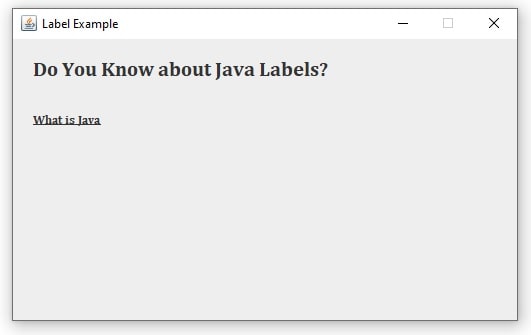
JLabel Example to getAttributes
import java.awt.Container;
import java.awt.Font;
import java.awt.font.TextAttribute;
import java.util.HashMap;
import java.util.Map;
import javax.swing.JFrame;
import javax.swing.JLabel;
public class JLabelExample5 extends JFrame {
    Container container;
    JLabel label1, label2;
    public JLabelExample5() {
        container = this.getContentPane();
        container.setLayout(null);
        label1 = new JLabel("Do You Know about Java Labels?");
        label1.setBounds(20, 10, 520, 40);
        Font font1 = label1.getFont();
        Map attribute1 = new HashMap<>(font1.getAttributes());
        attribute1.put(TextAttribute.FAMILY, "Cambria");
        attribute1.put(TextAttribute.SIZE, 20);
        label1.setFont(font1.deriveFont(attribute1));
        container.add(label1);
        label2 = new JLabel("What is Java");
        label2.setBounds(20, 60, 520, 40);
        Font font2 = label2.getFont();
        Map attribute2 = new HashMap<>(font2.getAttributes());
        attribute2.put(TextAttribute.FAMILY, "Cambria");
        attribute2.put(TextAttribute.UNDERLINE, TextAttribute.UNDERLINE_ON);
        label2.setFont(font2.deriveFont(attribute2));
        container.add(label2);
    }
    public static void main(String[] args) {
        JLabelExample5 frame = new JLabelExample5();
        frame.setTitle("Label Example");
        frame.setVisible(true);
        frame.setBounds(250, 100, 520, 320);
        frame.setDefaultCloseOperation(JFrame.EXIT_ON_CLOSE);
        frame.setResizable(false);
    }
}
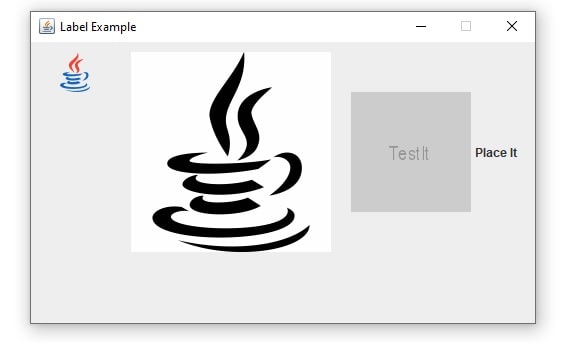
How to Show Image in JLabel
import java.awt.Container;
import java.awt.Image;
import java.io.IOException;
import java.net.URL;
import javax.imageio.ImageIO;
import javax.swing.ImageIcon;
import javax.swing.JFrame;
import javax.swing.JLabel;

public class JLabelExample5 extends JFrame {

    Container container;
    JLabel label1, label2, label3;
    ImageIcon ii1, ii2, ii3;
    URL url;
    Image image;

    public JLabelExample5() {

        container = this.getContentPane();
        container.setLayout(null);

        ii1 = new ImageIcon("d://javaicon1.png");
        label1 = new JLabel();
        label1.setIcon(ii1);
        label1.setBounds(20, 10, 50, 40);
        label1.setOpaque(true);
        container.add(label1);

        ii2 = new ImageIcon("d://javaicon2.gif");
        label2 = new JLabel();
        label2.setIcon(ii2);
        label2.setBounds(100, 10, 200, 200);
        label2.setOpaque(true);
        container.add(label2);

        try {
            url = new URL("http://placehold.it/120x120&text=TestIt");
            image = ImageIO.read(url);
        } catch (IOException ex) {
            System.out.println("Exception ");
        }
        ii3 = new ImageIcon(image);
        label3 = new JLabel("Place It");
        label3.setIcon(ii3);
        label3.setBounds(320, 10, 200, 200);
        label3.setOpaque(true);
        container.add(label3);
    }

    public static void main(String[] args) {
        JLabelExample5 frame = new JLabelExample5();
        frame.setTitle("Label Example");
        frame.setVisible(true);
        frame.setBounds(250, 100, 520, 320);
        frame.setDefaultCloseOperation(JFrame.EXIT_ON_CLOSE);
        frame.setResizable(false);
    }

}
Read More
- JComboBox in Java Swing
- JTable in Java Swing
- JTable Pagination in Java JDBC
- Registration Form in Java Swing
- Login form in Java Swing
- Simple Calculator in Java Applet
- Applet Life Cycle in Java