
A switch case is used to select one among multiple options.
Can we use arithmetic operators in switch case:
Yes, We Can use we. To provide symbols in a case statement a single quote is used.
To perform arithmetic operations, we create a case for each operator, for the matching operator, it will call the appropriate case statements and execute the statements.
In our program, we will use a switch case statement and do while loop statement
You can check both details here
algorithm for arithmetic operations using switch case in c
Lets see steps to write this C program
- Declare variables
- start loop
- get num1 ,operator, num2 value from user
- start switch case and pass operator in switch case
- write the case for arithmetic operators and their associated statements
- define default in switch case
- Take input from the user to check loop continuity
- if the user enters yes then repeat steps 2-7 else end the loop.
switch case arithmetic operations in c
The following image explains the switch case arithmetic operations in c. We passed a character c in switch case expression and provided symbols in the case statement.
Also provided a default statement if it doesn’t match with any case.
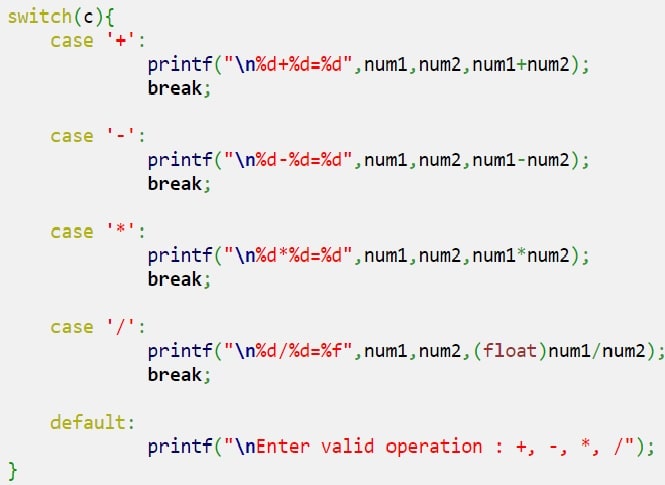
C program for arithmetic operations using switch case
#includeint main() { int num1,num2; char c,ch; do{ printf("\nEnter Num1 Operator [+,-,*,/] Num2 \n"); scanf("%d %c %d",&num1,&c,&num2); switch(c){ case '+': printf("\n%d+%d=%d",num1,num2,num1+num2); break; case '-': printf("\n%d-%d=%d",num1,num2,num1-num2); break; case '*': printf("\n%d*%d=%d",num1,num2,num1*num2); break; case '/': printf("\n%d/%d=%f",num1,num2,(float)num1/num2); break; default: printf("\nEnter valid operation : +, -, *, /"); } printf("\nEnter y to continue other character to end\n"); getchar(); scanf("%c",&ch); }while(ch=='y'); }
- Two Numbers and a character are taken from user and stored in variable num1 and num2 in variable c.
- Based on variable c we are deciding which operation to perform.
- variable c is passes to switch expression
- based on value it is selecting case statement.
- The entire process is inside do while loop
- If your press y then this loop continue
Output
Enter Num1 Operator [+,-,*,/] Num2
2 + 2

2+2=4
Enter y to continue other character to end
y

Enter Num1 Operator [+,-,*,/] Num2
3 * 2

3*2=6
Enter y to continue other character to end
y

Enter Num1 Operator [+,-,*,/] Num2
 5 - 1

5-1=4
Enter y to continue other character to end
y

Enter Num1 Operator [+,-,*,/] Num2
5 / 6

5/6=0.833333
Enter y to continue other character to end
y

Enter Num1 Operator [+,-,*,/] Num2
1 + 2

1+2=3
Enter y to continue other character to end
n
write a c program to perform arithmetic operations using switch case
#includeint main() { int num1,num2; int c; char ch; do{ printf("\nEnter 1. Addition 2. Substraction 3. Multiplication 4. Division 5. Modulo \n"); scanf("%d %d %d",&c,&num1,&num2); switch(c){ case 1: printf("\n%d+%d=%d",num1,num2,num1+num2); break; case 2: printf("\n%d-%d=%d",num1,num2,num1-num2); break; case 3: printf("\n%d*%d=%d",num1,num2,num1*num2); break; case 4: printf("\n%d/%d=%f",num1,num2,(float)num1/num2); break; case 5: printf("\n%d %% %d=%d",num1,num2,num1%num2); break; default: printf("\nEnter valid operation [1-5]"); } printf("\nEnter y to continue other character to end\n"); getchar(); scanf("%c",&ch); }while(ch=='y'); }
Enter 1. Addition 2. Substraction 3. Multiplication 4. Division 5. Modulo

10+20=30
Enter y to continue other character to end

Enter 1. Addition 2. Substraction 3. Multiplication 4. Division 5. Modulo

10-4=6
Enter y to continue other character to end

Enter 1. Addition 2. Substraction 3. Multiplication 4. Division 5. Modulo

2*2=4
Enter y to continue other character to end

Enter 1. Addition 2. Substraction 3. Multiplication 4. Division 5. Modulo

10/2=5.000000
Enter y to continue other character to end