
If else is used to select a set of statements based on condition.
If the condition is true then the statement associated with if is executed, otherwise else part is executed.
It can also be used without else.
If , if else, switch are conditions statements that Java supports.
If else has variations it can be used as follows
- If Statement
- If Else Statement
- Nested If Else
- Ladder Else If
1 If Else Statement
syntax of if else
if(condition){
     statements
}
else{
     statements
}
Condition specified in if statement is true then the statement associated with if statement are executed otherwise statements of else block is executed.
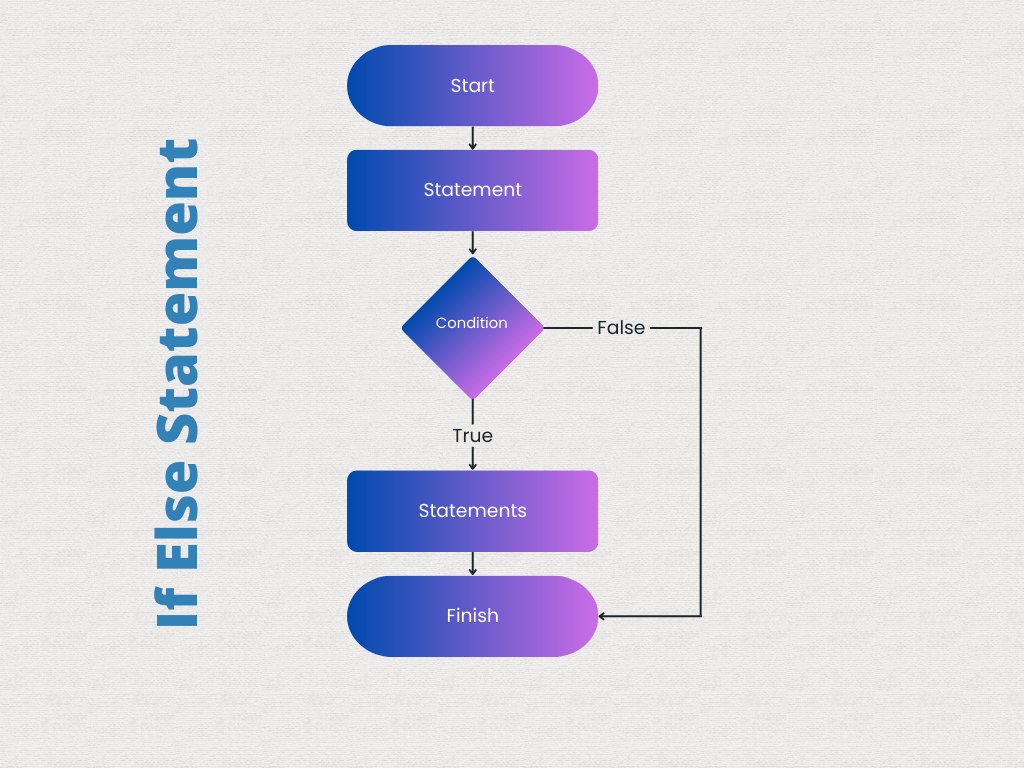
Example: Java Program to check values.
we use if else as follows
public class TestIfElse {

    public static void main(String[] args) {
        int a = 5;
        if (a == 5) {
            System.out.println("value of a is 5");
        }
    }
}
value of a is 5
Java Program to check greater among two values
public class TestIfElse {

    public static void main(String[] args) {
        int a = 5 b = 10;
        if (a < b) {
            System.out.println("a is greater");
        } else {
            System.out.println("b is greater");
        }
    }
}
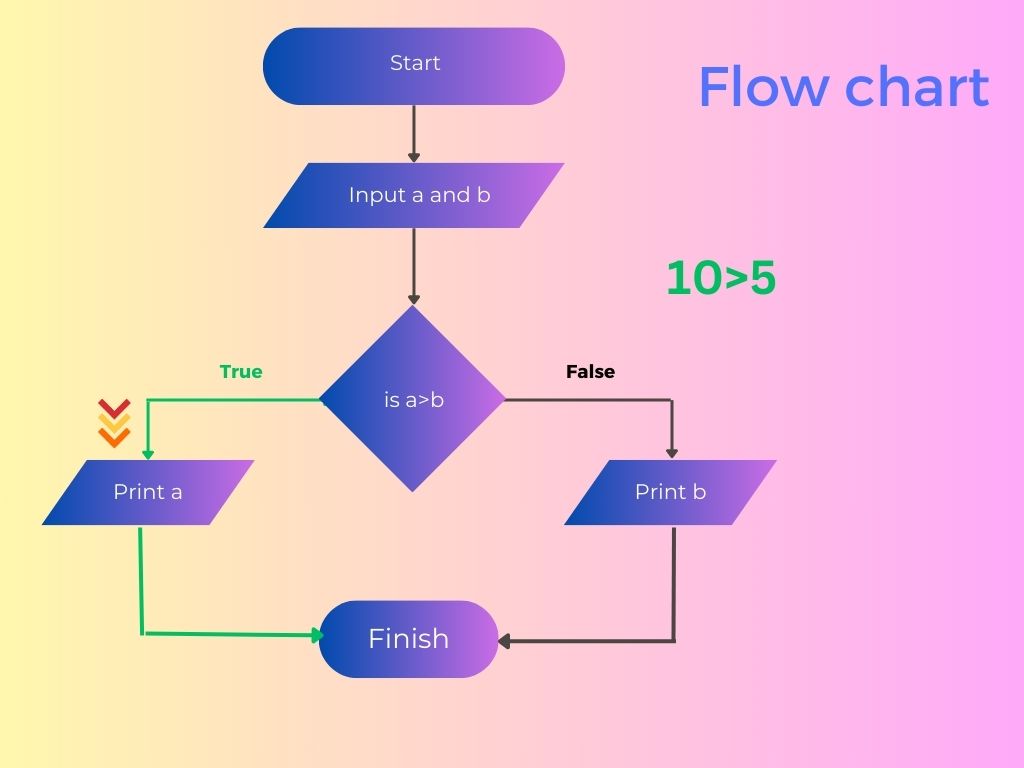
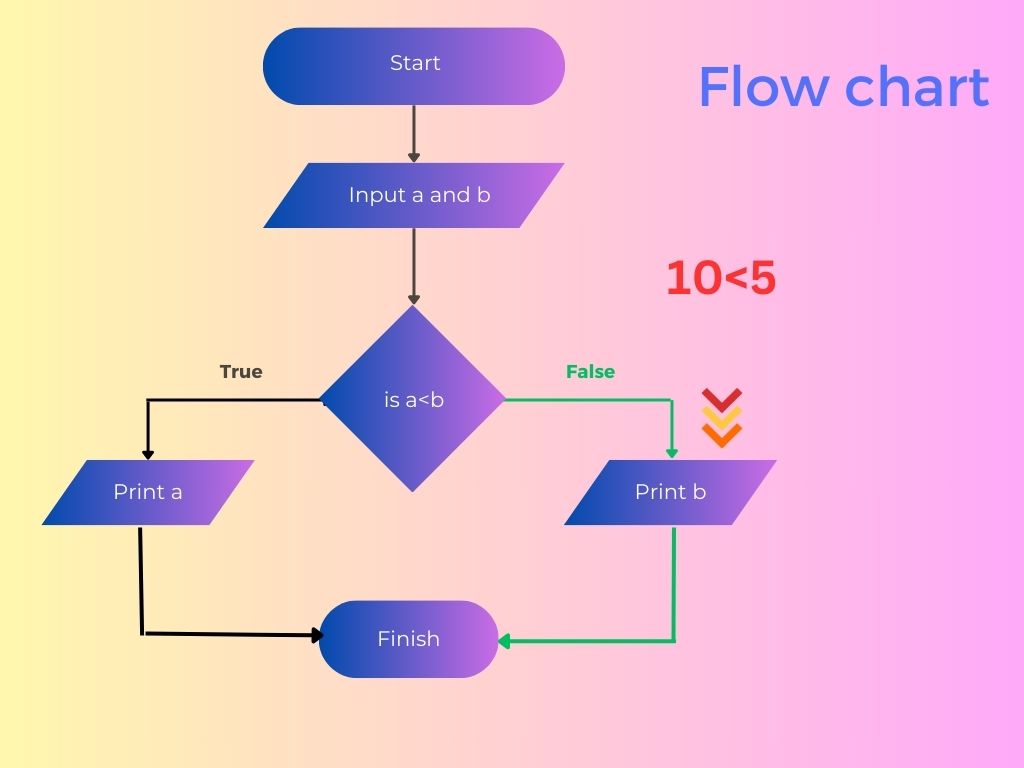
Output
b is greater
Q Write a Java Program to compare two Strings
import java.util.Scanner;

public class StringComparisonProgram {
    public static void main(String[] args) {
        Scanner scanner = new Scanner(System.in);

        // Input the first string
        System.out.print("Enter the first string: ");
        String firstString = scanner.nextLine();

        // Input the second string
        System.out.print("Enter the second string: ");
        String secondString = scanner.nextLine();

        // Compare the strings using the equals method
        if (firstString.equals(secondString)) {
            System.out.println("The two strings are equal.");
        } else {
            System.out.println("The two strings are not equal.");
        }

        scanner.close();
    }
}
2 If Statement
It is not mandatory to use else with if statement
Syntax of If statement
if (condition){
statement;
}
Example: To print value if is less than 10
public class TestIf {
    public static void main(String[] args) {
        int a = 5;
        if (a < 10) {
            System.out.println("value " + a + " is less than 10");
        }
    }
}
Output
value 5 is less than 10
This program will not do any thing if number is greater then 10
3 Nested if else in Java
if else statement can be used with in another if else statement.
If or if else inside another if else is known as nesting of if else.
Syntax
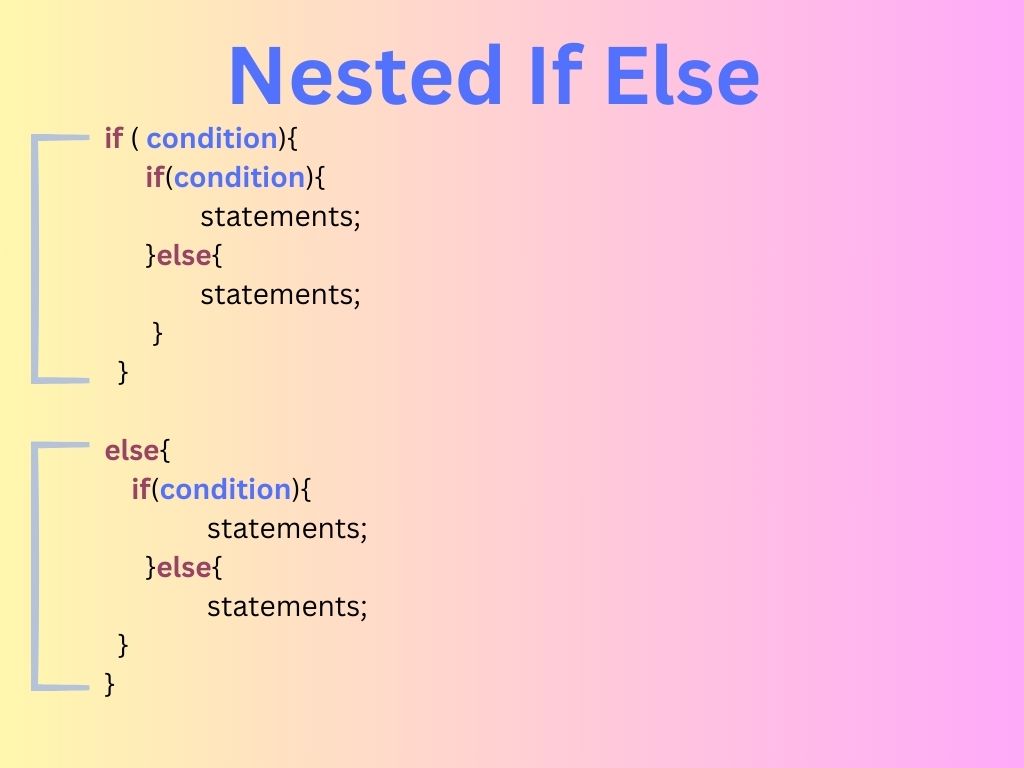
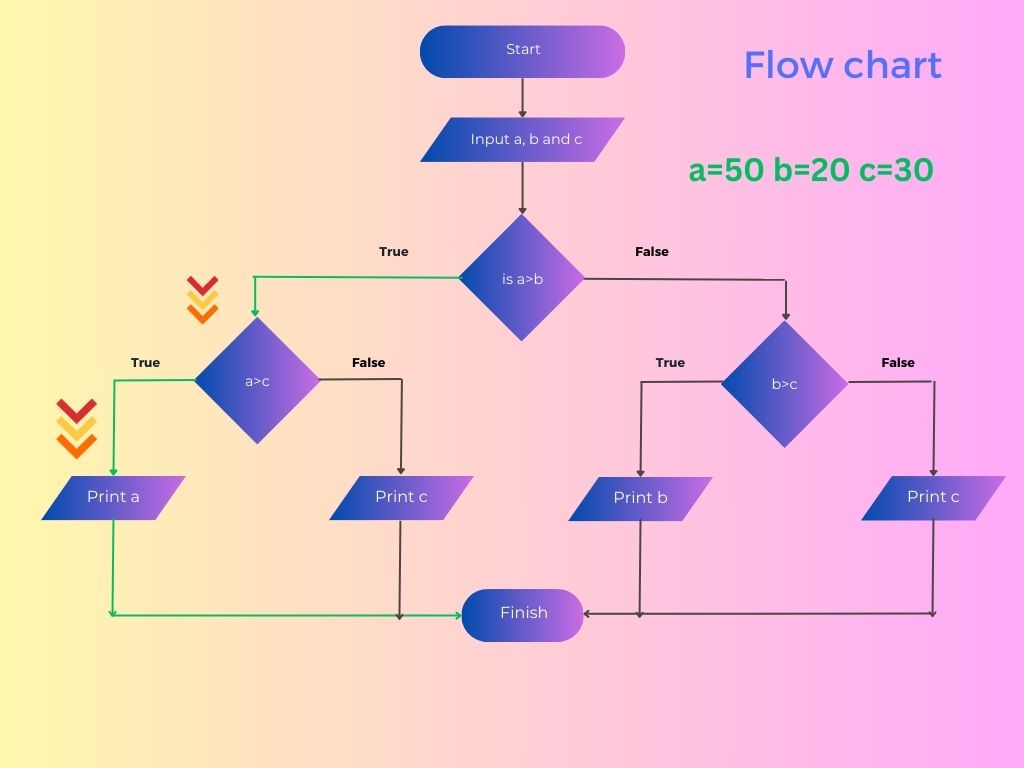
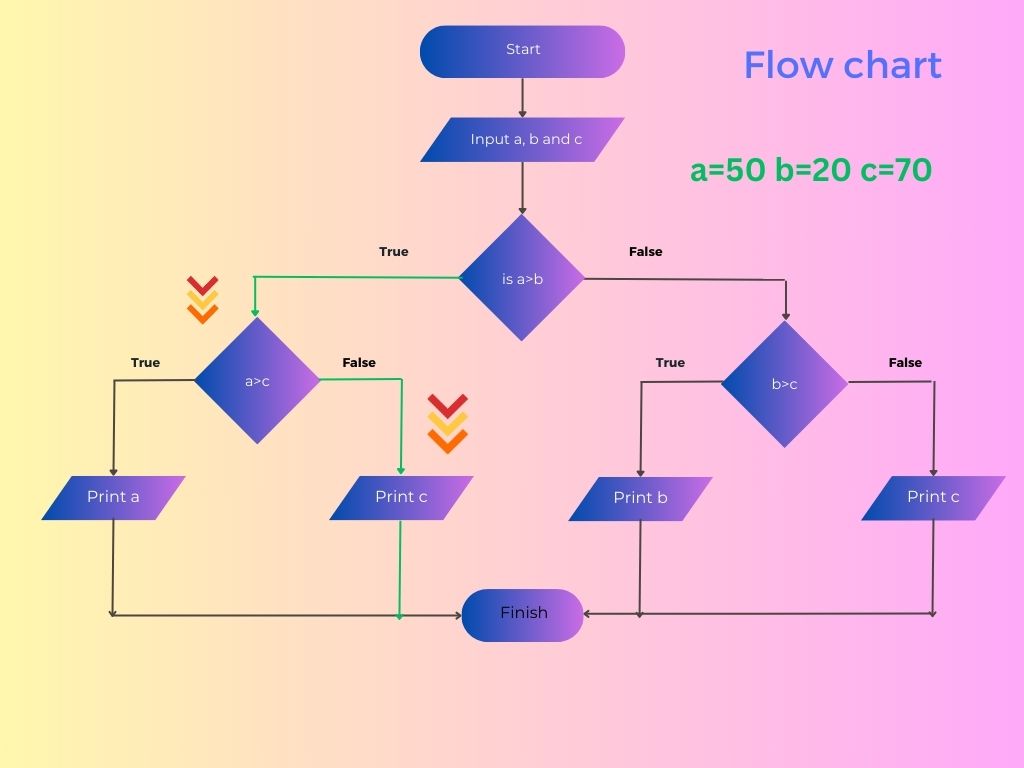
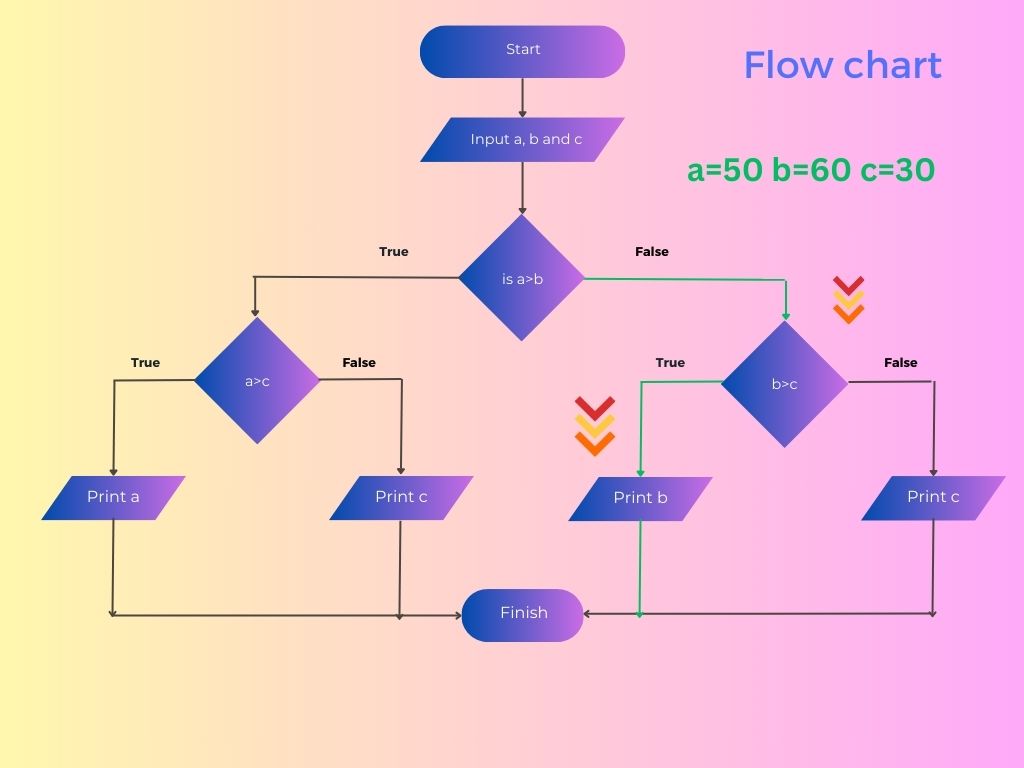
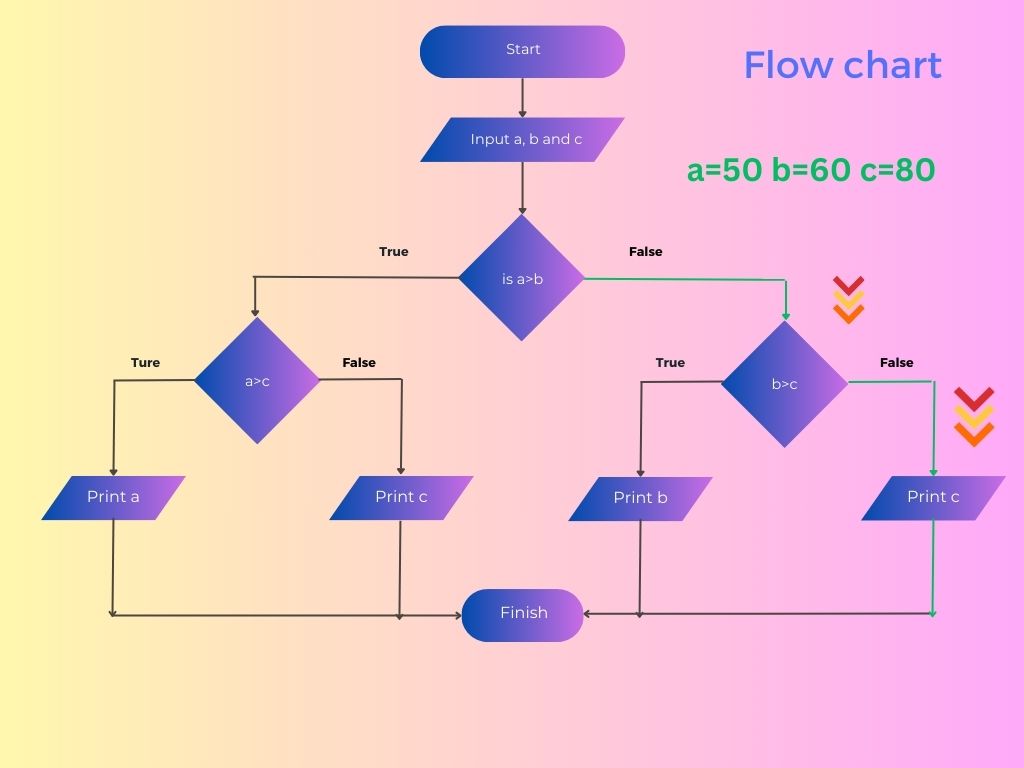
Example: Find the greatest among the three numbers.
This is a example of Nested if else.
public class Greatest {

    public static void main(String[] args) {
        int a = 6, b = 7, c = 9;
        if (a < b) {
            if (a > c) {
                System.out.println("a is greatest");
            } else {
                System.out.println("c is greatest");
            }
        } else {
            if (b< c) {
                System.out.println("b is greatest");
            } else {
                System.out.println("c is greatest");
            }
        }
    }
}
c is greatest
4 Else if ladder
Syntax
if( condition){
Statement 1;
}
else if(condition){
Statement 2;
}
else if(condition){
Statement 3;
}
else if(condition){
Statement 4;
}
.
.
else if(condition){
Statement n;
}
else{
Statement:
}
It is the combination of if else if statement Here execution of statement depends upon if statement's condition.
If the condition is true for if or else if block only its associated statement is executed rest of the condition is not checked.
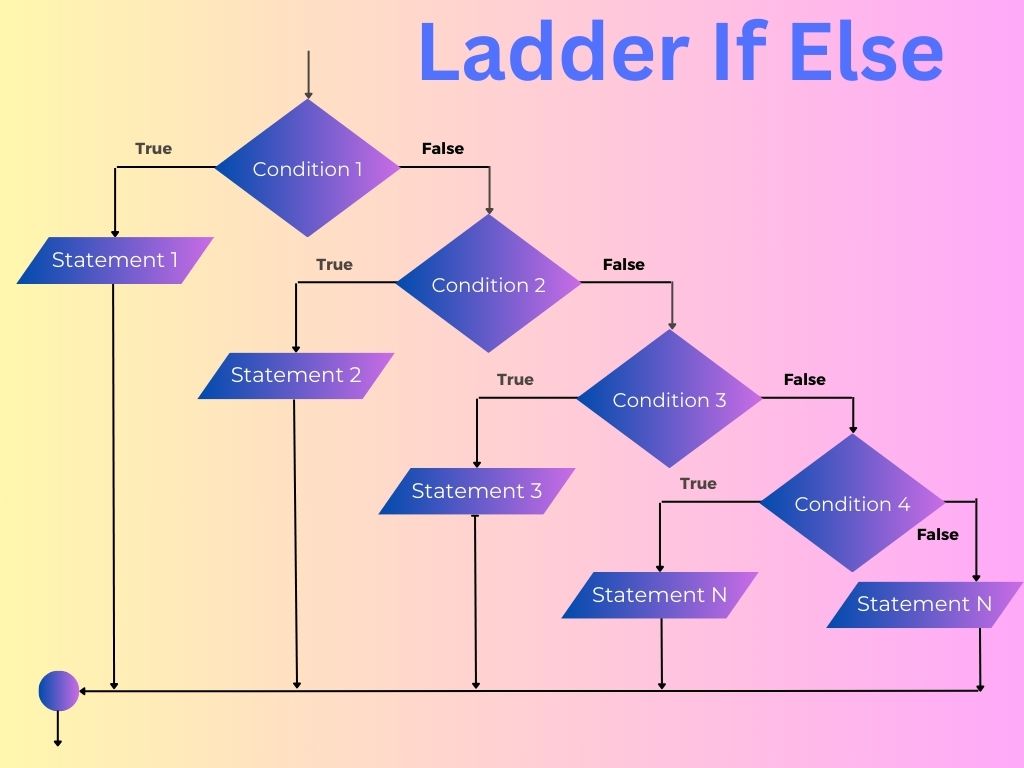
It any condition does not match then else block is executed.
Example: show the grade of student based on percentage in java Programming
This is a good example of If Else Ladder.
public class GradingSystem {
    public static void main(String[] args) {
        double percentage =85;
        if (percentage > 90 && percentage <= 100) {
            System.out.println("Outstanding");
        } else if (percentage > 80 && percentage <= 90) {
            System.out.println("Excellent");
        } else if (percentage > 60 && percentage <= 80) {
            System.out.println("First Division");
        } else if (percentage > 45 && percentage <= 60) {
            System.out.println("Second Division");
        } else if (percentage > 34 && percentage <= 45) {
            System.out.println("Third Division");
        } else {
            System.out.println("Fail");
        }
    }
}
5 If Else in short way (Ternary Operator)
We can write if else in short form using ternary operator
Syntax of Ternary operator is as below
variable=(condition)?expression1:expression2
If condition is true then expression1 is executed else expression2 will be executed.
and the result will be stored in variable.
Lets see one example of ternary operator
Example: Find the Greatest among two numbers using ternary operator.
public class TernaryExample {
    public static void main(String args[]) {
      int x=30;
      int y=25;
      int max=(x>y)?x:y;
      System.out.println("Greater number is " + max);
    }
}
Output
Greater number is 30
Java If Else Programs
Example: String comparison in If Else
Comparing two string to find is it working day or holiday
import java.util.Scanner;

public class MyClass {
    public static void main(String args[]) {
        Scanner scanner = new Scanner(System.in);
        String day = scanner.next();
        if (day.equalsIgnoreCase("Saturday") || day.equalsIgnoreCase("Sunday")) {
            System.out.println("Hurray Holiday");
        } else {
            System.out.println("Wow Its working day");
        }
    }
}
Example: Comparing dates in if statements
import java.util.Calendar;
import java.util.Date;

public class DateCompare {

    public static void main(String[] args) {

        Calendar cal1 = Calendar.getInstance();
        Calendar cal2 = Calendar.getInstance();
        Date date1 = new Date();
        cal1.setTime(date1);
        cal2.set(2018, Calendar.MARCH, 10);
        //cal2.setTime(date1);
        // cal2.set(2022, Calendar.MARCH, 10);
        System.out.println("Date1 :" + cal1.getTime());
        System.out.println("Date2 :" + cal2.getTime());
        if (cal1.after(cal2)) {
            System.out.println("Date1 is after Date2");
        }

        if (cal1.before(cal2)) {
            System.out.println("Date1 is before Date2");
        }

        if (cal1.equals(cal2)) {
            System.out.println("Date1 is equal Date2");
        }
    }
}
Output
Date1 :Fri Dec 04 11:46:50 IST 2020
Date2 :Sat Mar 10 11:46:50 IST 2018
Date1 is after Date2
You can un comment other two value and run to got other if statement executed
Example: Checking Boolean value in if statement
public class IfElseExample {

    public static boolean getValue() {
        boolean status = (Math.random() > 0.5) ? true : false;
        return status;
    }

    public static void main(String[] args) {
        if (getValue()) {
            System.out.println("Condition is true");
        } else {
            System.out.println("Condition is false");
        }
    }
}
Output
Condition is false
Here we are calling a method in if statement.
This method returns true or false.
based on boolean value it is showing if or else statement.