
To run applets we
An
Here we will see how to run applet from applet viewer
Example : Write a simple applet program to print “ Hello Students”
import java.applet.Applet;
import java.awt.Graphics;

/*


*/

public class APdemo extends Applet {
    String s = "Hello Students";
    public void paint(Graphics g) {
        g.drawString(s, 100, 100); // print string at 100*100 pixel location
    }

}
Compile Save & Run: Save this file with APDemo.java name.
Compile : javac APDemo.java
Run: appletviewer ApDemo.java

import java.applet.Applet;
import java.awt.Graphics;

/*


*/

public class APDemo1 extends Applet {
    String s = "Hello Students";

    public void init() {
        System.out.println("Inside init method");

    }
    public void start() {
        System.out.println("Inside start method");
    }

    public void paint(Graphics g) {
        System.out.println("Inside paint method");
        g.drawString(s, 100, 100); // print string at 100*100 pixel location
    }
    public void stop() {
        System.out.println("Inside stop method");
    }
    public void destroy() {
        System.out.println("Inside destroy method");
    }

}
Note: In an applet program first init() method executes then start() method. After start(), paint() executes.
Compile Save & Run: Save this file with ApDemo1.java name.
Compile : javac APDemo1.java
Run: appletviewer APDemo1.java
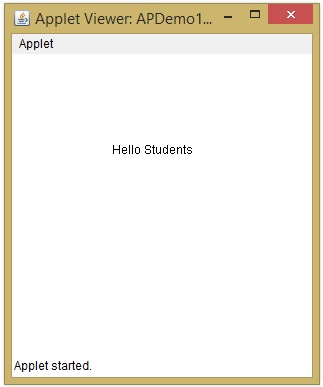
After running applet we will see following output in console
Inside init method
Inside start method
Inside paint method
Inside stop method
Inside destroy method